BOVPN to Fortigate

Hi
I'm trying to setup a BOVPN with a couple of Fortigate Firewalls. Two seperate jobs not related. I've worked through the WatchGuard guide and tried numerous other combinations without success. Does anyone have a known working set of parameters please and has anyone ever got one working?
Thanks
Andy.
Comments
-
Have you looked at this?
Fortinet FortiGate Policy-Based BOVPN Integration Guide
https://www.watchguard.com/help/docs/help-center/en-US/Content/Integration-Guides/General/Fortinet_BOVPN.html0 -
Hi Bruce
Thanks and no I'd not found that, I was working from an older guide by the look. I'll give this one a try and report back.
Andy
0 -
FortiGate default VPN configuration way is Route-Based VPN!
WG calls this BOVPN Virtual Interface configuration.
https://www.watchguard.com/help/docs/help-center/en-US/Content/Integration-Guides/General/Fortinet_BOVPN_virtual_interface.htmlYou can of course use the Policy-based VPN configuration.
In WG this is the VPN Gateway and VPN Tunnel configuration.
https://www.watchguard.com/help/docs/help-center/en-US/Content/Integration-Guides/General/Fortinet_BOVPN.htmlNowadays the recommended way to build Site-to-Site BOVPN is the Route-based way…. 😊
0 -
For BOVPN with virtual interface, it works the best with another WatchGuard.
Have you guys got any experience using virtual interface to form site to site VPN with other vendor(brand) successfully ?0 -
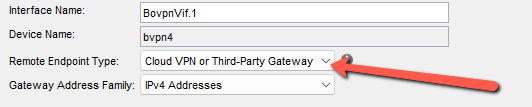
WG BOVPN Virtual Interface = Route-based with 3.party firewall.
With 3.party firewall you need to make sure "Remote Endpoint Type" is
Cloud VPN or Third-Party Gateway.
You should changes to this, even if the VPN is between two Firebox device... 0
0 -
 0
0 -
Thanks I haven't actually got around to trying this again yet so I'll look at this method as well.
0 -
Hi I am having quite a bit of trouble setting up a policy based bovpn with a remote fortigate I cannon manage.
Tunnel is up but remote site cannot reach my host.
It's a stupid question, but they gave me a 198.x.x.88/29 network for nat (1:1) and they are trying to reach me by the first address 198.x.x.88, is this correct? from the logs my source ip nat is 198.x.x.89.
Also, can you point me to an example of policies to allow traffic? are the default BOVPN-Allow.in and .out sufficient for traffic from remote network to my internal?0 -
Hi @Francesco
1:1 NAT will mean the distant end will attempt to contact you via the NAT'ed address, and the firewall will translate the NATed address to the real one.
The first address is available for use since there isn't a network ID/gateway in this scenario.
I'd suggest opening a support case. Our techs can help determine if that traffic is even reaching your firewall. If you'd prefer to troubleshoot yourself, having the distant end send pings is usually the best way since there does not need to be a TCP connection in order for the ping to traverse (meaning you'll see log lines in your traffic monitor if logging is enabled for your bovpn allow.in policy.)
1


