Citrix Connection To State Gets Error

Hello all,
I am very confused on this. Got a new M295 Firebox and advanced security. Without the advanced secruity we are able to get to the Montana Website through their citrix connection. Now that we put advanced security on the M295 firebox, when we try to connect to the Montana Website through their Citrix, we sign on and then get CANNOT COMPLETE YOUR REQUEST where it should test to see if we have Citrix on the computer or not.
I have done everything that I can think of adding this to the web blocker, adding it to the proxies, ensuring port 443 is open then adding a policy of ports 1494 and 2598 coming from IP address of 161.7.8.91 - 161.7.8.94 (These are the external IP addresses of citrix.mt.gov and mfa.citrix.mt.gov).
Everything I try i still get the error message above. Please help as I have no idea what to do anymore.
Thanks,
Kelly W.
Comments
Okay I have turned off IPS, Application Control, Botnet Detection and Web Blocker individually and still come up with this error.
This is far from strange. Tried this at a different clients that has basic subscription with WatchGuard and get the same thing. Tried it at a third client that is using a Sonicwall and it comes up correctly.
try to set enable "TCP MTU Probing" to Enabled
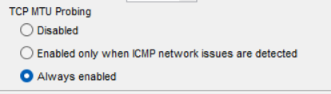
okay i will try that
i sure hope it works
Okay tried the TCP MTU Probing to Enabled and still does not work.
Hi @kellyw
I'd suggest opening a support case if you haven't done so already. One of our technicians can take a look at your logs with you and help determine what the issue is.
-James Carson
WatchGuard Customer Support
I will be calling at around 3 am Mountain time tomorrow morning for tech support since i can't figure this thing out and it works great on Sonicwall firewalls.
Spent 5 hours on tech support this morning and it is escalated to tier 3 tech support with no resolution. I believe that it is the latest update to the M295 that caused this. WIll be working with level 3 technical support tomorrow morning on this again.
Well that was interesting.
It was a managed server was setup that is no longer used (and hasn't been used in 7 years) somehow got onto the firewall. Not sure how but it is fixed and it is all unicorns, puppies, and rainbows for my client!
@kellyw Glad to hear everything is working!
-James Carson
WatchGuard Customer Support