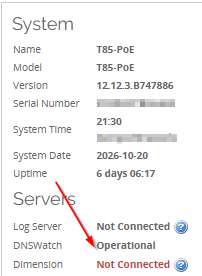
Firebox T85 DNSWatch servers not responding, registration fails when Firebox DNS = its own IP

Description
Since yesterday ~17:30, DNSWatch stopped working on a Firebox T85-PoE (Fireware [version]) sitting behind another router (WAN 192.168.0.7, static public IP). The config is unchanged from when it worked: Firebox DNS set to 192.168.1.1 (its own internal interface), DNS Forwarding on, DNSWatch enabled with enforcement on Trusted/Optional/Custom, DHCP handing out the Firebox IP.
Symptoms
- Registration fails:
failed to obtain DNS-server addresses ... dnswatch.watchguard.com ... [Errno -3] Temporary failure in name resolution. - With DNS = 192.168.1.1, client browsing breaks.
- Setting the Firebox DNS to 8.8.8.8 lets registration succeed (status Operational), but
test.strongarm.ioisn’t blocked (“DNSWatch is misconfigured”) and resolves to real IPs.
What I checked
- A WAN packet capture with DNS = 192.168.1.1 shows queries leaving toward both DNSWatch servers (34.240.115.208 and 34.251.171.117, port 53), retransmitted, with no replies at all. Ping, NTP and HTTPS to other hosts work fine.
- Policies and exceptions don’t block those servers, and the public IP is static and unchanged.
Questions
- Could DNSWatch stop answering because the IP/network association was lost on the cloud side?
- Can double NAT affect how DNSWatch recognizes the network?
- Is it OK to keep an external DNS (8.8.8.8) on the Firebox with DNSWatch enabled, or does it bypass filtering?
- Anyone else seeing this in the last few days?
Thanks! Cris
Comments
-
Consider opening a support case on this
0 -
Hi Bruce,
since yesterday the issue seems to have disappeared, but now I'm getting [log] on the DNSWatch test "http://test.strongarm.io/"
2026-10-20 07:59:28 Deny 192.168.1.70 54.173.101.99 http/tcp 53416 80 INTERNA WAN ProxyDeny: HTTP DNSWatch blackholed domain (HTTP-proxy-00) Default-HTTP-Client proc_id="http-proxy" rc="595" msg_id="1AFF-0040" proxy_act="Default-HTTP-Client" host="test.strongarm.io" path="/" geo_dst="USA"
0 -
Why is a HTTP packet going to 54.173.101.99 - test.strongarm.io from 192.168.1.70 ?
0 -
I was running a test for DNSWatch on "test.strongarm.io" to see if the service was working. If I run it again now, I'll be able to check.
0 -
again:
2026-10-20 14:08:06 Deny 192.168.1.70 54.173.101.99 http/tcp 49203 80 INTERNA WAN ProxyDeny: HTTP DNSWatch blackholed domain (HTTP-proxy-00) Default-HTTP-Client proc_id="http-proxy" rc="595" msg_id="1AFF-0040" proxy_act="Default-HTTP-Client" host="test.strongarm.io" path="/" geo_dst="USA"
Traffic
0 -
0
-
The deny reason tells you why it is being blocked: "HTTP DNSWatch blackholed domain"
The certificate Common Name for that site (test.strongarm.io) is blackhole.dnswatch.watchguard.com
If you want to see the status of DNSWatch on your firewall, check Subscription Serivces → DNSWatch in your Web UI. It should show Status:
Operational
0