External Access Firebox authentication.

Hello WatchGuard Community,
I am trying to allow an external VDI machine (Azure-hosted, static public IP) to access the WatchGuard Authentication Portal on port 4100. Despite having the correct configuration in place, the connection is timing out and the portal is unreachable from the external network.
Here is what I have already confirmed and ruled out:
CONFIGURATION IN PLACE:
- WG-Auth policy is enabled with the VDI public IP in the FROM list
- TO field contains only Firebox (no Any-External)
- Connections are set to Allowed
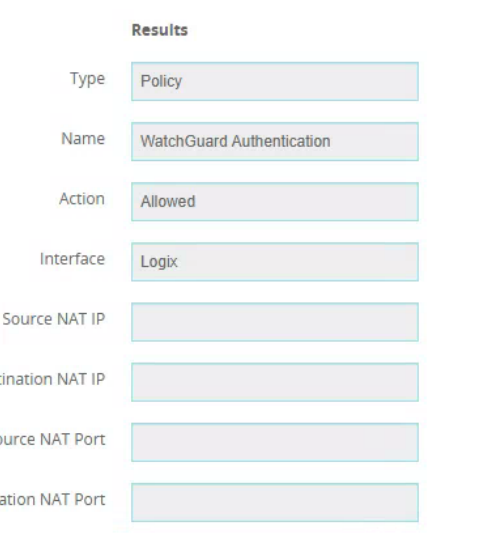
- Policy Checker confirms the traffic is Allowed for that source IP on port 4100
- VDI true egress IP confirmed via curl ifconfig.me — matches what is in the policy
TROUBLESHOOTING DONE:
- Test-NetConnection from VDI to Firebox WAN IP on port 4100 = TcpTestSucceeded: False (Timed Out)
- Ping to WAN IP also times out
- Confirmed the VDI public IP using ifconfig.me — it matches the IP in the WG-Auth policy
- Reviewed Authentication Settings page — no option found to enable portal per interface in Fireware 12.11
- Policy Checker shows WatchGuard Authentication policy is matching and set to Allowed
Any help will be appreciated.
0
Comments
-
Any denies in your logs from the VDI public IP address?
0 -
Hi @fizz1
If we're not seeing a deny or allow log line, it's likely the traffic isn't reaching the virtual firewall itself.
0

