LogonApp Error 5433

Hello,
I am currently configuring LogonApp in my lab environment using the trial version and have encountered a few issues during the setup.
For local users, the LogonApp returns error 5433, even though the account has been configured as a non-MFA user and the policy allows non-MFA authentication. Despite this configuration, the same error continues to appear during logon.
For Active Directory users, the system displays a “user not found” message, although the users are correctly present in the domain and appear to be synchronized.
During my research, I came across information suggesting that a Group Policy Object (GPO) may need to be configured on the domain for the LogonApp agent to function properly. However, I was unable to find any reference to this configuration step in the videos available on the Learning Center.
I would appreciate your assistance in confirming whether a specific GPO configuration is required and in guiding me through the correct setup for this part of the implementation.
Thank you in advance for your support.
Kind regards,
Comments
-
Hi @ydekraoui
There's quite a few items that may potentially be causing this issue. If you haven't created a support case, it may be helpful to do so, so that one of our techs can look at your configuration.If you're attempting to log in a local user, you'll likely need to create a group policy to allow the local users to log in.
0 -
Thank you for your reply. I already opened a support case.
I already created the group policy to test for the local user but it didnt work still, I guess i'm still missing something somewhere.
I'll be continuing on researching/testing.
Thank you
0 -
Meanwhile, I'd be glad if anyone can share his experience or some tips that I might be missing for the Logonapp Configuration.
0 -
Update : Tech support checked my WG Cloud and said everything Okey, and advised to chetck "the AD side of things" (I was not kinda surprised about that )
Here u'll find the GPO I already configured before:
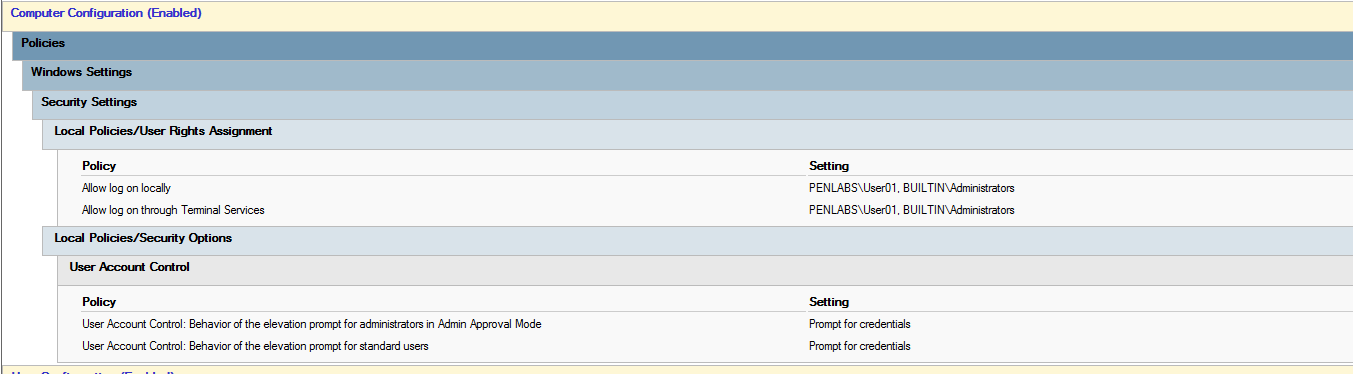
I was recommanded to check this link : https://learn.microsoft.com/en-us/windows/security/application-security/application-control/user-account-control/settings-and-configuration?tabs=intune
I'd be glad if anyone please could share the right GPO config or link for any ADMX available for this part.
Best regards
0 -
@ydekraoui If that tech isn't able to assist, please ask them to escalate the case. If you can reply with the case number, I can request that as well if you'd prefer not to.
0 -
The tech that was assigned the case was assigned helped me the checking onthe WG Cloud config and said that Everything is okey, the problem must be from " the AD side of things. He provided this link "https://learn.microsoft.com/en-us/windows/security/application-security/application-control/user-account-control/settings-and-configuration?tabs=intune" that I found vague.
0
