Firebox M690 Availble Storage

Hallo,
Is it normal that the available storage on the Firebox M690 is so small? If not, is there any way to increase the capacity of the local storage?
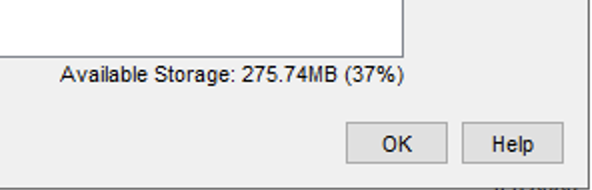
Thanks a lot
Regards
Comments
-
Memory is dynamically managed in all modern OSes, including Linux (Fireware)
When more is needed for a process, some currently allocated memory will be freed.0 -
Hallo Bruce,
"Available Storage" on Firebox means Memory, not local diskspace?
Regards.
0 -
Humm. Not sure now.
Storage is 512 GB on a M690
RAM is 16 GBSeems like it should be referring to RAM here.
Where are you seeing this value?0 -
@Bruce_Briggs said:
Where are you seeing this value?That value, comparing it to the Firebox setups I have here, comes from the "Backup and Restore" dialogue in WSM - it's the amount of storage available for backups on the device.
(The screenshot looks like it's in the same location as where I'm seeing it here).Looking at one of the production M290 cluster setups I deal with, that one says "Available Storage: 318.93MB (43%)".
Even a test FireboxV I have shows similar values and that one has far more backups stored.Given each backup is about 1MB or less, and that storage in question is - I suspect - purely for backups, there might not be an issue here.
The OS itself has its own storage that it manages, so would assume this is the free space on the partition that users can access for backups.For memory as in RAM, open Firebox System Manager and look at the Status Report under the Memory Info heading.
0 -
@masterofdebian
Most firebox models don't offer much storage. Most traffic is stored in RAM while it is being scanned/processed.Storage on the device itself is generally reserved for firmware, security service signatures, and device backups.
For some tasks, such as backup, you can insert a USB thumb drive into one of the firewall's open USB ports. Aisde from that, there is no way to upgrade the storage.
You can find the storage included with each firewall in that device's hardware guide:
https://www.watchguard.com/help/docs/help-center/en-US/Content/en-US/Hardware-Guides/intro/firebox-hardware-guides.html0


