Upgrade failed for one member in the firebox cluster

I started an upgrade for a M295 cluster from 2025.1.4 to 2026.1. But only one firebox got upgraded. The other one failed ("Member upgrade failed. Could not apply the upgrade image to the member").
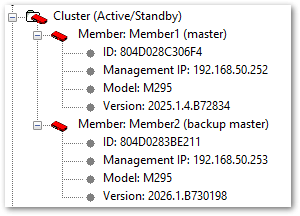
What can I do to get even the second one on 2026.1?
Thanks and regards,
Chris
Comments
-
Hi @Chris1414
I'm assuming this cluster is locally managed since you're showing a WSM screenshot.
In order to fix this, you'll need to:
-In Policy Manager, go to Firecluster -> Configure, view members, and copy the feature key for member2 into a text document. You'll need this.
-If you don't already have 2026.1 downloaded, please download it from software.watchguard.com
-Remove Member2 from the cluster by uncabling it. This will allow you to connect to it directly.
-Factory reset Member2 following the directions here:
(Reset a Firebox)
https://www.watchguard.com/help/docs/help-center/en-US/Content/en-US/Fireware/backup_upgrade_recovery/recovery_procedures_c.html-Using WSM, log directly into the firewall. If you plug a PC directly into port 1, you should get an IP address in the 10.0.1.x range, and the firewall will be 10.0.1.1.
Default passwords are
status / readonly
admin / readwrite-In WSM, open Policy Manager, and go to Setup -> Feature Key. Import the feature key you got for member2 in the first step.
-Go to File -> Upgrade, and upgrade the firewall to 2026.1.
-Once complete, factory reset the firewall again
-Connect back to the network and connect to the cluster/member1.
-Open Firebox System Manager and allow it to connect.
-Connect Member2 back into the network by reconnecting the cables you disconnected previously; it should be cabled as it was originally. Member2 should be powered on in a factory reset state.
-In Firebox System Manager, go to Tools -> Cluster -> Discover Member.
-Member1 should attempt to configure Member2 and bring it back into the cluster.
(Discover a Cluster Member)
https://www.watchguard.com/help/docs/help-center/en-US/Content/en-US/Fireware/ha/cluster_discover_member_wsm.htmlIf this happens next time you attempt to upgrade the cluster, please generate a support file right after the upgrade fails and open a support case. Our support team can help determine why the upgrades are failing and work to correct the issue with you.
(Download a Diagnostic Log Message File in Firebox System Manager)
https://www.watchguard.com/help/docs/help-center/en-US/Content/en-US/Fireware/fsm/downoad_support_file.html0 -
Hi Chris, there's a Know Ledge entry from Watchguard regarding this problem.
https://techsearch.watchguard.com/KB?type=Known Issues&SFDCID=kA1Vr000000FFZpKAO&lang=en_US
0 -
I'm also facing failure with Cluster upgrade M395. Previously, with 2026.1 and now with version 2026.2.
Backup member seems to upgrade but fail. Ticket is open with the support. I don't manage to find what's wrong, I guess a misconfiguration in the cluster. For a long time, I always use Managements IP in an other ip range than the interface is, but I'm wondering if this could be the trouble root cause.
Also management IP refered to a Vlan on an agregation link, rather than a physical interface.
Does someone now if this could lead to this kind of trouble?
Best regards,0 -
Hi @JimmyL
There's not enough information in your description to determine the root cause of your issue. I'd suggest continuing on with the support case if you're able.If the case is not moving forward, please ask the technician to escalate, or reply with the case number and I can ask that technician's lead to get the case escalated for you.
Thank you,
0 -
Hi,
I found by mself the trouble. On M395 series when you use Fiber interface for cluster primary interface. The backup master upgrades but when restarting there is a bug, the fiber interface doesn't come up and firewall enters in a kind of waiting mode.
Bellow an extract from console interface:WG
#
[FAULT]WG#[ 1096.364222] Running /etc/runlevel/4/K00armled...Done.
[ 1096.365145] Running /etc/runlevel/4/K01backuplog...Done.
[ 1096.453024] Running /etc/runlevel/4/K02guestacct...Done.
[ 1096.453053] Running /etc/runlevel/4/K08fqdnsave...Done.
[ 1096.455096] Running /etc/runlevel/4/K09haeventsave...Done.
[ 1096.456419] Running /etc/runlevel/6/S01bootmon...Done.
[ 1096.457477] Running /etc/runlevel/6/S05sshdown...Done.
[ 1096.458835] Running /etc/runlevel/6/S10ethdown...[ 1107.959647] unregister_netdevice: waiting for eth12 to become free. Usage count = 1
[ 1118.119645] unregister_netdevice: waiting for eth12 to become free. Usage count = 1
[ 1128.279648] unregister_netdevice: waiting for eth12 to become free. Usage count = 1
[ 1138.416312] unregister_netdevice: waiting for eth12 to become free. Usage count = 1
[ 1148.549644] unregister_netdevice: waiting for eth12 to become free. Usage count = 1
[ 1158.682976] unregister_netdevice: waiting for eth12 to become free. Usage count = 1It remains in this state until you manualy reboot and then upgrade fails.
After configuring a copper interface for primary cluster interface, the problem disapeared.After sending these logs to support, then finaly involved this open r&d request:
https://techsearch.watchguard.com/KB?SFDCID=kA1Vr000000FBJJKA4This is complicated because we need to use this fiber interface for this cluster.
Don't you have other customers complaining about this trouble ?0 -
Hi @JimmyL
It looks like they're working on a solution that should allow the use of the fiber port. If you have a support case, please ask the tech to notify you when a fix is available, if you haven't already.0


