Client can't connect from one site with Public-WiFi but can from others

Hi clever people. Could someone help me please?
Long story short we've got a T40 and a few sites. They all work spot on, apart from one council managed building which has a public wifi, and a gov wifi. Staff laptops connect to both SSIDs fine, and internet works. But then, when they try to connect to the VPN, the software shows "Waiting for connection. Waiting for the initial response from the server" and that's it, just sits there. I'm watching the firewall traffic at the same time, and it looks like it is connected, at our end, but it isn't at theirs.
Here are some snippets from the traffic log:-
2026-04-28 09:12:07 Deny
2026-04-28 09:12:08 admd Authentication of Firewall user [STAFFMEMBER@Firebox-DB] from
2026-04-28 09:12:08 sslvpn Mobile VPN with SSL user STAFFMEMBER logged in. Virtual IP address is . Real IP address is . msg_id="2500-0000"
In the last example, the ip address is blank, I haven't deleted it.
Many thanks in advance!

Comments
-
The blank IP addr is Known Issue FBX-27827
Resolved In: Fireware v2026.2/v12.12"IP addresses missing from msg_id=2500-0000 log message"
https://techsearch.watchguard.com/KB? type=Known%20Issues&SFDCID=kA1Vr0000008bIXKAY&lang=en_USNothing else in Traffic Monitor for the logged in SSLVPN user?
If not, try enabling logging on your Allow SSLVPN-Users policy or add a policy From: this userID To: whatever is desired, with Logging enabled.0 -
And you should be able to see the logged in IP addr in the Web UI -> System Status -> Authentication List
0 -
Thanks Bruce, emily has tried logging in from that particular site via gov wifi. She's the only one in the list who isn't being given an IP address, and her mobile VPN client window just pops back up asking for credentials.
I've just enabled logging
again
 0
0 -
My best guess is that the gov wifi is doing Inspect or similar and modifying the HTTPS packets.
Can she try using a different VPN connection type?0 -
Hi Bruce, haven't tried a different VPN type - is it easy enough to set up?
0 -
Thanks can this be run alongside the current SSL connections or will everybody have to switch method0
-
You can have multiple client VPN types enabled on your firewall and on client PCs.
I have SSLVPN, IKEv2 & (the old) IPSec set up on my firewall and have the clients set up on my laptop. I can use the one I want.1 -
Many thanks I will try and set it up this afternoon. I have no way of testing it until tomorrow as they are only at that site in the morning I have just found out0
-
Thanks Bruce, IKEv2 all set up and works fine for me. Will see what happens Tuesday when they next go to site
0 -
Hi Bruce, she has tried logging in and the IKE won't connect

Connects fine at my desk. Doesn't show her as connected in the active connections list, and I did a search for the IP address in the traffic log and there was nothing there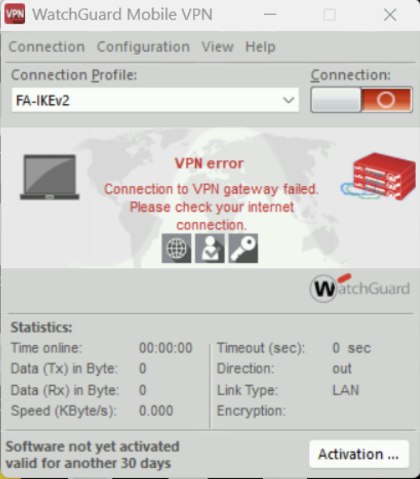 0
0 -
Looks like that site is blocking these client VPN connections.
0
